To listen to music offline on Android, you need the songs saved on the phone itself and an app that plays them without a connection. Streaming apps can do this with downloads, but usually only on a paid plan. The free way is to keep your own music files on the phone and play them with an offline music player such as Tunefold. Below is how the two options differ, where music files come from, and how to set everything up in a few minutes.
Streaming downloads vs your own music files
There are two very different kinds of "offline music" on a phone.
- Downloads inside a streaming app. Streaming services let you download songs for offline listening, usually on a paid plan. The downloads are protected files: they play only inside that app, you can't copy them, and they stop working if the subscription ends or the app hasn't been online for a while.
- Music files you own. MP3, M4A, FLAC and similar files are ordinary files. They play in any music player, work forever without internet, and you can copy them to a new phone or a memory card.
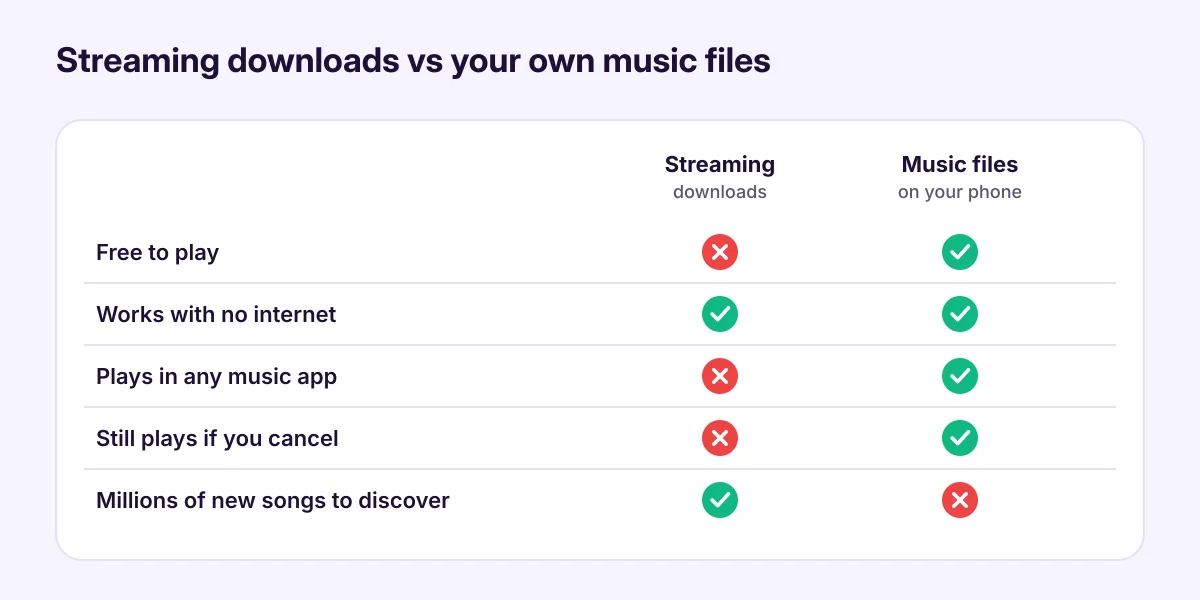
Many people use both: a streaming app for discovering new music, and their own files for the albums they love, long trips and places with no signal.
Where your own music files come from
- Music you bought as downloads. Many artists and stores sell DRM-free downloads, often in MP3 or FLAC. Bandcamp is a well-known example.
- Your CDs. You can copy (rip) CDs you own to MP3 or FLAC on a computer, then put the files on your phone.
- Free and Creative Commons music. Some artists release music for free on their own websites, and some libraries publish public-domain recordings.
- Your old phone or computer. If you've collected music over the years, it's probably still in a Music folder somewhere.
Stay away from apps and websites that "download any song" from streaming sites. They usually break the service's terms and copyright law, and they're a common source of malware.
Set up offline music on your phone
- Copy the music to your phone. Connect the phone to a computer with a USB cable, or use a memory card. Our guide on how to transfer music to an Android phone walks through each way.
- Install an offline music player. Tunefold is free, has no account and no internet features. It finds the songs Android lists in its music library, in Music, Download, a memory card or any other folder.
- Allow access to music. The first time you open Tunefold, tap Allow access to music. On Android 13 and newer this lets the app read audio files only, not your photos or documents.
- Play. Your songs appear under Songs, Albums, Artists and Folders. Tap a song to start, or Shuffle all.
That's it. Turn on airplane mode and the music keeps playing.
Make offline listening better
- Build playlists before a trip. A playlist for the gym, the commute or a long flight saves scrolling later. See how to make a playlist on Android.
- Tune the sound. Cheap earphones and phone speakers often sound thin. An equalizer preset can help; our guide to equalizer settings explains which one to pick.
- Fall asleep to music. A sleep timer stops the music for you, so it doesn't play all night. See how to set a sleep timer for music.
- Keep files organised. One folder per artist or album, with correct tags (title, artist, album), makes albums and artists show up properly.
How much space does music take?
Roughly, at common quality settings:
- MP3 at 320 kbps: about 2.4 MB per minute, so a 4-minute song is about 10 MB.
- MP3 at 128 kbps: about 1 MB per minute.
- FLAC (CD quality): about 5 to 8 MB per minute.
So 1,000 songs in good MP3 quality take about 8 to 10 GB. If your phone is short on space, a microSD card is a cheap way to carry a large library, if your phone has a card slot.
Does offline music save battery and data?
Playing a file that's already on the phone uses no mobile data at all, and it usually uses less battery than streaming, because the phone doesn't keep the radio busy downloading audio. That makes offline music handy on long trips and on prepaid plans.
Common questions
Do I need an internet connection to use Tunefold? No. Tunefold has no internet features. It plays the files on your phone.
Can Tunefold play songs downloaded in a streaming app? No. Those downloads are protected and play only inside the streaming app.
Which formats work? MP3, M4A (AAC), FLAC, OGG, Opus and WAV, among others.
Why don't all my songs show up? Usually a permission, a hidden folder or a filter for short clips. See music files not showing on Android.