The best equalizer setting is the one that fixes what your headphones or speaker get wrong: thin earbuds need a little more bass, muffled headphones need more treble, and a phone speaker sounds better with less deep bass, not more. Start from a preset close to what you want, then move one band at a time by small steps. Below is what each band does, which preset to pick for common situations, and how to add bass without distortion.
What the equalizer bands do
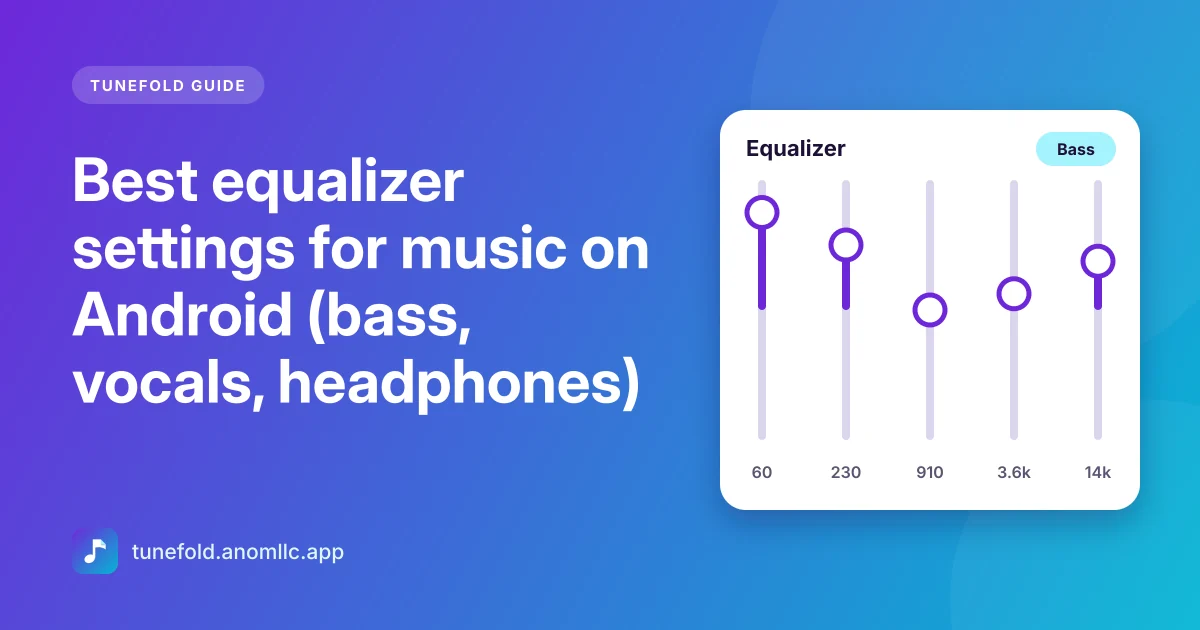
Most Android phones offer the app equalizer five bands. In Tunefold they're these:
| Band | What you hear | Too little | Too much |
|---|---|---|---|
| 60 Hz | Deep bass, kick drum, rumble | Thin, no punch | Boomy, distorted |
| 230 Hz | Warmth and body of bass and voices | Cold, hollow | Muddy, boxy |
| 910 Hz | Mids: the core of voices, guitars, piano | Distant | Nasal, honky |
| 3.6 kHz | Presence: clarity of vocals and words | Muffled | Harsh, tiring |
| 14 kHz | Air: cymbals, sparkle, detail | Dull | Hissy, sharp |
Some phones offer more bands. Tunefold spreads its presets over whatever bands your phone has.
Which preset to choose
- Normal: everything flat. The music as it was mixed. Start here with good headphones.
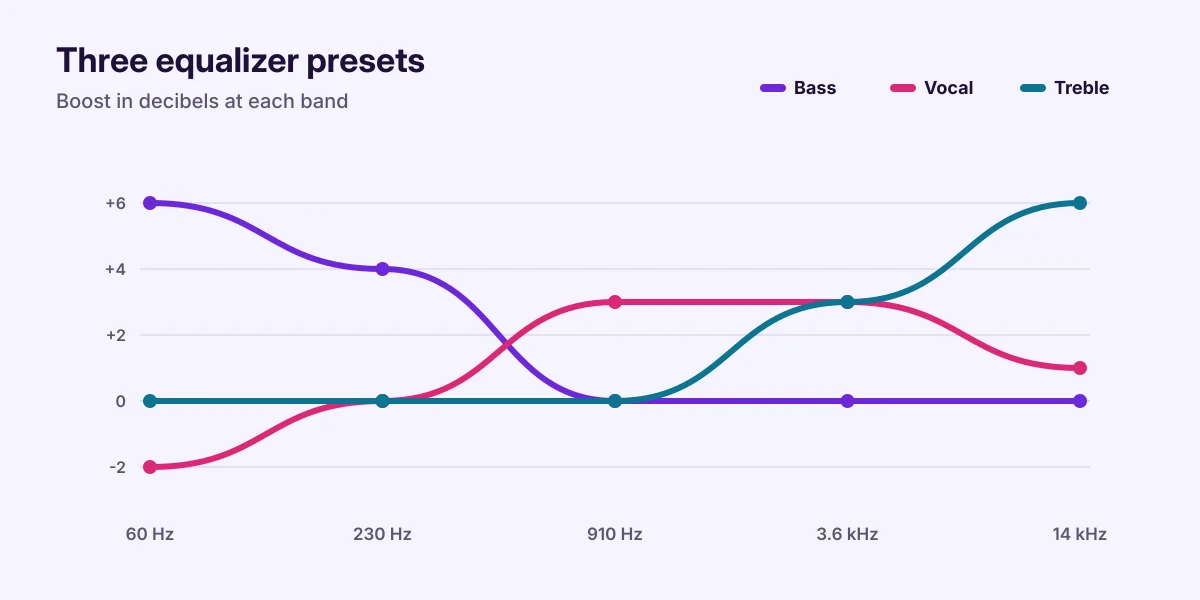
- Bass: +6 dB at 60 Hz and +4 dB at 230 Hz. For earbuds that sound thin, and for hip-hop and electronic music.
- Pop: a gentle lift in the mids, where vocals and melodies live.
- Rock: a "smile" curve with more lows and highs, for guitars and drums with punch.
- Hip-hop and Electronic: strong lows with some sparkle on top.
- Jazz and Classical: a wide, open sound with a slight dip in the mids.
- Vocal: less deep bass and more mids and presence. Great for podcasts, audiobooks, talks and phone speakers.
- Treble: more high end, for dull or muffled headphones.
Settings for your headphones or speaker
- Cheap wired earbuds: try Bass, or Normal plus a little bass boost (20 to 30%).
- Over-ear headphones: start with Normal. If they sound dark, try Treble or raise 14 kHz by 2 to 3 dB.
- Bluetooth earbuds: many have their own equalizer in the maker's app. Use one equalizer at a time, either theirs or Tunefold's, so the two don't stack.
- Phone speaker: choose Vocal, or lower 60 Hz. A small speaker can't play deep bass, and boosting it only adds distortion.
- Car stereo (Bluetooth or cable): leave the phone on Normal and use the car's own bass and treble controls first.
Boost bass without distortion
Boosting adds energy. Too much and the sound starts to crackle on loud parts. To avoid it:
- Boost less, cut more. Instead of raising bass by 10 dB, raise it by 4 to 6 dB and lower the 910 Hz band by 2 dB.
- Use bass boost gently. In Tunefold, bass boost from 20 to 50% is usually enough.
- Lower the volume a step after boosting. If it crackles at full volume, it's clipping.
- Avoid stacking effects. Turn off other "sound effects", "audio enhancement" or surround features in your phone's settings while you use the app's equalizer, then compare.
Set your own curve in Tunefold
- Open Equalizer from the menu on the home screen, or from the full player.
- Turn on Use equalizer.
- Tap a preset to start from, then move the band sliders. Moving a slider switches to Custom, which Tunefold remembers.
- Use Reset to go back to flat.
The equalizer uses your phone's built-in sound effects, so it works with any headphones, wired or Bluetooth, and it affects only music played in Tunefold.
A quick listening test
Pick a song you know very well and play the same 30 seconds while you switch presets. Listen for:
- Voices: clear and in front, not hidden or harsh?
- Bass: full but tight, not booming over everything?
- Cymbals: crisp, not hissing?
Trust your ears. There's no single "best" setting for everyone, only the one that sounds right on your headphones.
Common questions
Why doesn't the equalizer change anything? Check that Use equalizer is on. A few phones don't offer an equalizer to apps; Tunefold tells you when that's the case, and bass boost may still work.
Does the equalizer drain the battery? Not noticeably.
Will it affect other apps? No, only what Tunefold plays.
Related guides: offline music on Android and how to make a playlist.